Getting started
Welcome to NADOVO. This page gives you an overview of the platform and the recommended order for getting started. Answers to specific questions are in the FAQ; a detailed description of each area is under Modules.
What is NADOVO?
NADOVO is the AI compliance platform for the DACH Mittelstand. It helps you meet the requirements of the EU AI Act in a structured, verifiable way and without legal jargon — from capturing your AI systems to ongoing monitoring.
The NADOVO framework
NADOVO implements the NADOVO AI Compliance Framework — a practical lifecycle approach. EU AI Act compliance is not a one-time project but a continuous cycle that adapts to change (new systems, changed use cases, new requirements). You work through the phases step by step — not all at once.
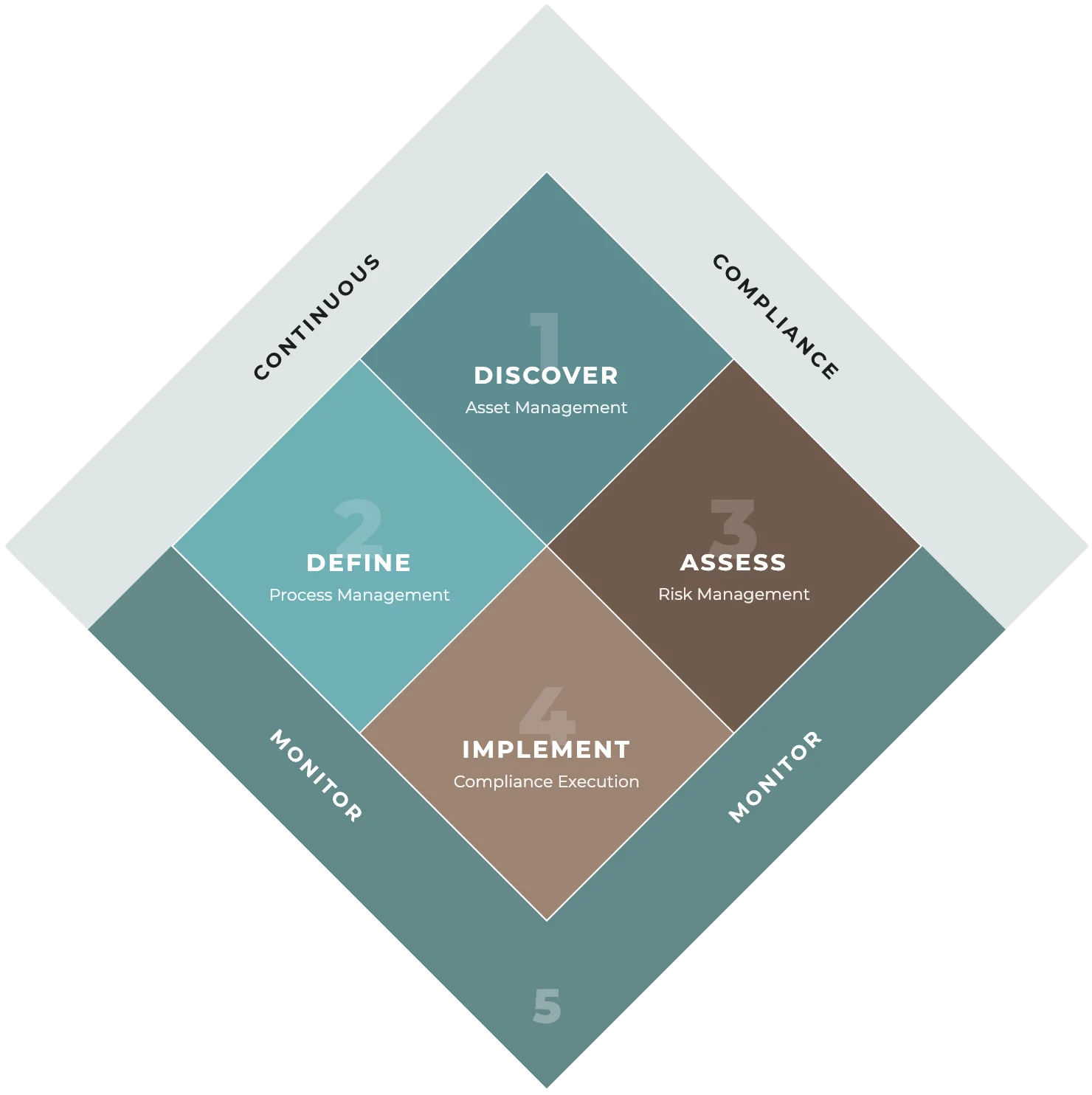
In 5 steps to safe AI use — four core phases (understand and implement), framed by continuous monitoring:
- Discover — What is already in use? Capture all AI tools, uncover shadow AI, clarify responsibilities.
- Define — What is AI used for? Define purposes, understand data, define risks.
- Assess — What risks exist? Assess risks, set priorities, define measures.
- Implement — How do we put it in place? Create rules, implement measures, train the team.
- Monitor — How do we stay on course? Monitor AI usage, document changes, review regularly.
The core formula
Asset + application area = AI process — and from that the risk class follows. An AI system alone says nothing about the risk; only the use case determines the classification. The same system can be minimal or high-risk depending on its use.
Full guide
A detailed explanation of the framework, the risk classes and the obligations is in the free guide "EU AI Act Compliance for SMEs": download the PDF.
How the platform is structured
The navigation on the left is organized into:
- Dashboard — the start page: the compliance monitor with your company's open check points (administrators and consulting partners), "For me" with your personal tasks and responsibilities, and "Latest changes" as an event feed.
- Compliance journey — the 5 phases (Discover, Define, Assess, Implement, Monitor) with their respective modules.
- AI Models — the catalog of AI models (e.g. GPT-4, Claude) that your AI systems select from.
- AI Content Register — the evidence register for AI-generated content (Art. 50 EU AI Act): capture, review and release content — linked to the generating AI process.
- Reports & Evidence — all reports in one place (change report, AI content proof, qualification proof) with a log of who generated which report and when (visible to company admins).
- Organisation — your team, roles and the company profile (visible to company admins).
- Settings — your personal preferences: profile (name), appearance (theme light/dark/system and language) and password. Theme and language apply per user account and are saved automatically.
- Help & Support.
You can find details on each area under Modules.
Your first steps
Recommended order to get started:
- Set up your team & company (Organisation): invite users, maintain your company profile — including the country (determines the pre-filled reporting authority for AI incidents) — and define the person responsible for EU AI Act compliance in the "AI Compliance Officer" section.
- Select AI models: add the models you use to "My models" from the model catalog. Do this before creating an AI system — you cannot add a model from within the AI system wizard.
- Capture your first AI system (Phase 1): create an AI system, assign the models used (or "Unknown" if not yet added or known), answer the AI definition question in the "Documentation" step and set the status to "In operation".
- Define an AI process (Phase 2): for the AI system, describe the intended purpose and select the application area from the curated list — NADOVO classifies the process automatically.
- Perform an assessment (Phase 3): a risk assessment is mandatory before you can release the process — for high-risk processes and whenever the assessment status reads "Required".
- Measures & AI literacy (Phase 4): implement the defined measures and document your employees' AI competence in the "AI Literacy" module (internal measure, external proof or experience assessment).
- Document AI content (AI Content Register): capture relevant AI-generated content (text, image, audio, video, dialogue) as an entry, review it and release it — the entry documents review and marking under Art. 50 and links the content to the AI process from Phase 2.
- Monitoring (Phase 5): capture AI incidents and review your compliance regularly.
Tips for getting started
- Start with the most important systems, not with completeness. An inventory that captures your five to ten most important AI systems is worth more than a claim to perfection — you can add the rest step by step.
- Ask across all departments which AI tools are in use. Often there are more than expected: many standard applications (Microsoft 365 Copilot, CRM, accounting) now contain AI, and employees use services like ChatGPT or DeepL on their own — so-called shadow AI.
- Clarify your own role early. Most SMEs are deployers for all of their AI systems. That is a relief, because deployer obligations are more manageable than provider obligations.
- Tackle high-risk systems first. They require the most extensive measures — begin with what matters most: organize human oversight and set up the documentation.
- Implement quick wins right away. Some things take little effort: add a notice when customers interact with an AI, or set up an internal AI usage policy that governs which tools are allowed and which data must not go into external AI services.
- Document AI content from day one. From 2 August 2026, the transparency obligations of Art. 50 EU AI Act apply. Anyone relying on the review exemption for AI texts must be able to prove the human review if challenged — the AI Content Register keeps that evidence, and an entry takes less than a minute.
- Appoint a responsible person. A central point of contact coordinates the topics — this can be the data protection officer with an extended mandate, the IT lead or a specifically designated person.
- Treat compliance as a continuous cycle. Schedule regular reviews (e.g. quarterly) and run through the cycle again whenever something significant changes. The AI inventory is a living document, not a one-time project.
- Use the help in the wizard. The card "Help & notes" sits to the right of the form: hovering over or clicking a field box explains that field, and where there is one, the "Legal basis" block links straight to the article on EUR-Lex. When "Next" is locked, the reason stands beside it.
- Plan realistically. You don't have to manage status changes and version numbers yourself; NADOVO guides you through the necessary steps and points out open items.
- The FAQ answers specific questions; each module is described in detail under Modules. Background on the EU AI Act and further best practices are under Knowledge & Best Practices; the guide (PDF) goes deeper into the methodology.
As of July 2026